
How to Help a Contact Re-Subscribe to Paragon SMS Text Messages
If a client has previously opted out of Paragon SMS messages and wants to start receiving them again, follow the steps below:
Important:
A phone number can only opt back in once every 30 days.
If it hasn’t been 30 days, you’ll see a message saying the number cannot opt in yet.
Steps to Re-Subscribe a Client:
Click this link: https://sdmls.paragonrels.com/CCR/paragonsubscriptions/sms?phone=
Add the client’s 10-digit phone number (with area code, no spaces or dashes) to the end of the link.
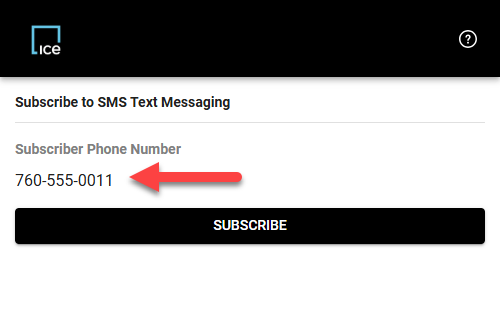
Example: If your client’s phone number is 760-555-0011, the full link should be:
https://sdmls.paragonrels.com/CCR/paragonsubscriptions/sms?phone=7605550011Press Enter and the phone should appear under "Subscriber Phone Number" just like the image below.Click SUBSCRIBE to complete the process.
Let your client know they should start receiving SMS messages again shortly.
Need Local Assistance |
If you have any problems or questions please call SDMLS Support (858) 373-4010 or send an email to - Support@sdmls.com |
Was this article helpful?
That’s Great!
Thank you for your feedback
Sorry! We couldn't be helpful
Thank you for your feedback
Feedback sent
We appreciate your effort and will try to fix the article